PunchLog
PunchLog — punch lists for the jobsite

Built for
closeout.

Photo the defect. Mark it up. Send it to the sub. Track it to closed. Works with no signal and syncs when it comes back.

Download for iPhoneFree while in beta
Android is coming to Google Play
Project dashboard for 214 Garden Place Reno: 11% resolved, 4 open, 4 in progress, 0 in review, 1 closed, a 5 overdue warning, and recent activity
  1. ProgressItems resolved, counted for you.
  2. Status set on the serverA sub marks it ready. Only the super closes it.
  3. ActivityWho changed what, and when.
  4. Works offlineCapture with no signal. Syncs on its own.
Fig. 01 — Dashboard
Photos per item
Up to 10
Statuses
4
Exports
PDF · CSV
Capture with no signal
Yes

Section 02 — Screens

Five screens.
Each does one job.

01 — Dashboard

Where the job stands.

Open the app and the job is already counted: items resolved against the total, and how many are open, in progress, waiting for review and closed. Overdue work is flagged. The activity feed shows who changed what.

A
Progress
Items resolved of total
B
Status counts
One tile per status
Project dashboard for 214 Garden Place Reno: 11% resolved, 4 open, 4 in progress, 0 in review, 1 closed, a 5 overdue warning, and recent activity

02 — The list

Every item, filtered.

Filter by status and trade, sort by due date, group by status or floor. Pick several items and set their status or assignee in one go. Each sub sees only their own work.

A
Filters
Status and trade
B
Multi-select
Set status or assign, together
Punch list grouped by status with filters for status and trade; two items are selected and a bar offers Set status and Assign

03 — One item

The photo, the markup, the status.

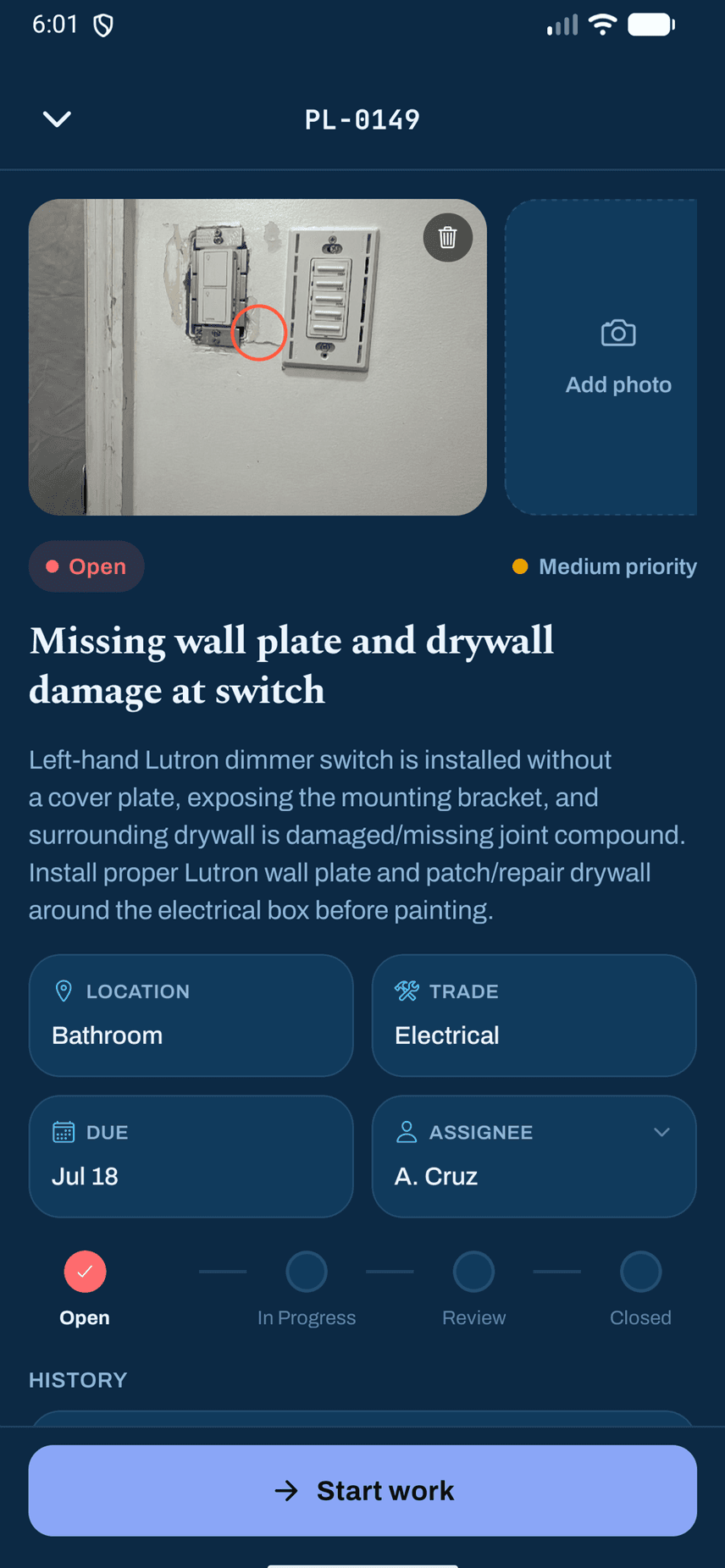
Circle the problem on the photo. The markup is saved with it, so it looks the same in the list, the item and the report. Up to 10 photos per item, with location data stripped on the phone before upload. A sub can mark the item Ready for Review; only the superintendent closes it.

A
Markup
Saved with the photo
B
Status
Open to Closed, checked by the server
Open punch item PL-0149, missing wall plate and drywall damage at switch: photo with a red circle around the damage, location, trade, due date, assignee and a status stepper

04 — Reports

A sheet the sub can sign.

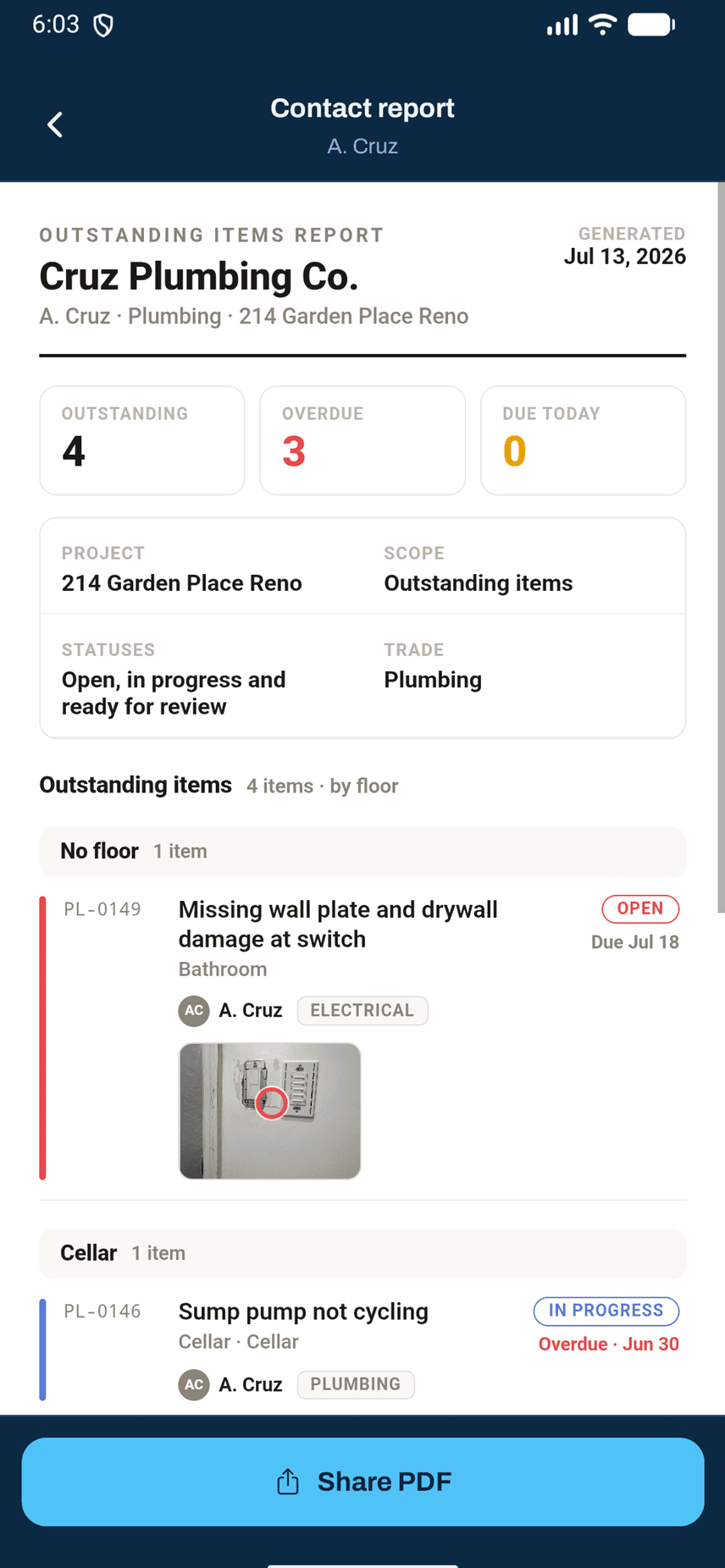
Hand each sub their outstanding items, grouped floor by floor, with signature lines. Photos, markups and pins are on the sheet. Share it as a PDF, or export the list as CSV, even offline.

A
Counts
Outstanding, overdue, due today
B
Grouping
Floor by floor
Outstanding items report for Cruz Plumbing Co.: counts of outstanding, overdue and due today, then items grouped by floor with a photo, and a Share PDF button

05 — On the plan

Pin it where it lives.

Upload a plan for each floor and drop a pin where the item is. The person fixing it knows exactly where to go, and the pin rides along on the report.

A
Pin
Where the item is on the floor
B
Legend
Pin colour shows status
Floor plan with five numbered pins coloured by status on an architectural drawing, with tabs for Floor 1, Basement and Cellar

Section 03 — Tech specs

Tech specs.

PunchLog for iPhone, as it ships today.

Photos per item
Up to 10, with markup saved on the photo
Status
Open, In Progress, Ready for Review, Closed
Status changes
Checked by the server. A subcontractor can mark an item Ready for Review; the superintendent verifies and closes it.
Roles
Administrators run the company. Superintendents run the job. Subcontractors see the work assigned to them. An owner or architect can join a project as submit-only.
Assign to
A subcontractor firm, or a named person there
Floor plans
One plan per floor, a pin per item
Exports
PDF, CSV
Reports
Full list, or one contact's outstanding items grouped floor by floor, with signature lines
Offline
Capture and update with no signal; syncs automatically
Notifications
Push, with a switch for each kind; optional 6 AM Eastern email digest
Privacy
Location data stripped from photos on the phone, before upload. No ads.
Platform
iPhone. Android is coming, not yet available.
Price
Free while in beta

Get it

Walk the job.
Close the list.

Download for iPhone

Free while in beta. No card.

Running the company? Register your company

Not on iPhone? Android is coming